> ## Documentation Index
> Fetch the complete documentation index at: https://novu-c5de82d9-docs-homepage-redesign.mintlify.site/llms.txt
> Use this file to discover all available pages before exploring further.
# Activity Tracking
> Manually forward push notification delivery, open, and dismissal events from your mobile or web app to Novu for unified activity tracking across channels.
To enable activity tracking for Push channel notifications, Novu supports a manual integration approach for push notifications. Where your application captures and forwards push notification events to Novu. Once received, Novu processes and displays these events on the dashboard for a unified tracking experience.
## How it works
The process involves a four-step data flow from your subscriber's device to Novu's servers:
1. **Client application listens**: Your application listens for push notification interactions. For example, the user opens a notification.
2. **Event sent to your backend:** When an event occurs, your application sends a payload containing the event details to an endpoint on your own server.
3. **Backend forwards to Novu:** Your server receives this data and uses the Novu SDK to securely forward the event to Novu's API.
4. **Event appears in Novu:** Novu processes the event and displays it in the **Activity Feed**, alongside events from your other channels.
## Step 1: Enable push activity tracking in Novu
Enable push activity tracking in your Novu dashboard and get the necessary credentials.
1. Log in to the Novu dashboard.
2. Navigate to the **Integration Store** page, and then select your push provider.
3. Enable the **Push Activity Tracking** toggle.
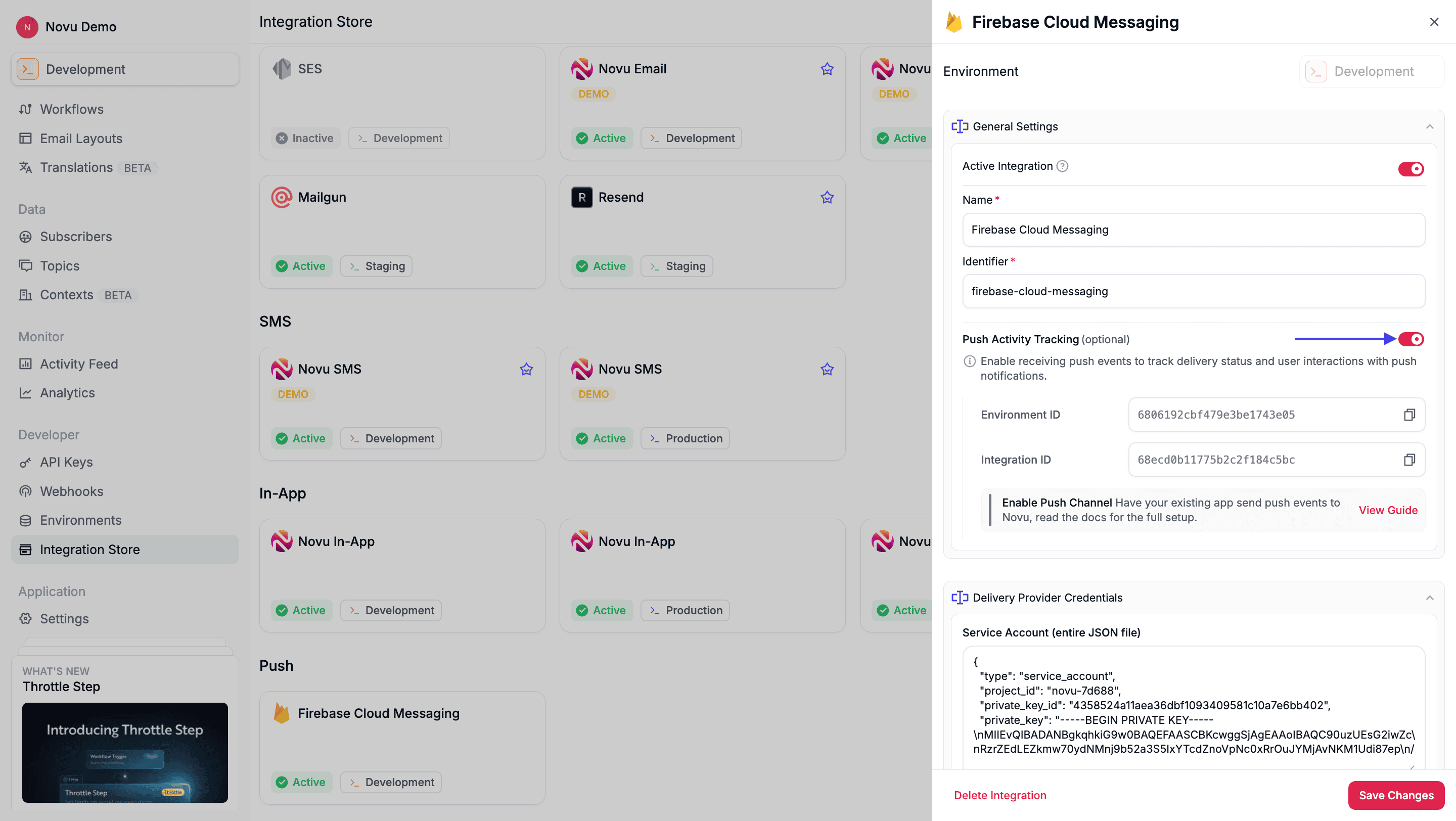 4. Once enabled, your unique **Environment ID** and **Integration ID** are displayed. Copy and save both of these; you will need them for your backend code.
5. Click **Save Changes**.
## Step 2: Listen for push events in your application
When push notifications are delivered or interacted with, your application must capture those events and forward them to your backend. The exact code implementation depends on the push provider that you use.
The goal is to capture the event and send a JSON payload to your backend. You must send these fields:
* `eventType`: A string describing the event (for example, `opened`, `clicked`).
* `eventId`: The unique identifier for the notification, which Novu includes in the push payload as `__nvMessageId`.
```jsx theme={null}
// Listen for notification interactions
Notifications.addNotificationResponseReceivedListener(async (response) => {
const eventData = {
eventType: "opened",
eventId: response.notification.request.content.data?.__nvMessageId,
timestamp: new Date().toISOString(),
actionIdentifier: response.actionIdentifier,
content: {
title: response.notification.request.content.title,
body: response.notification.request.content.body,
data: response.notification.request.content.data,
},
// Optional device context
deviceId: Constants.sessionId,
platform: Platform.OS,
}});
await fetch("https://your-api.com/api/notifications/events", {
method: "POST",
headers: { "Content-Type": "application/json" },
body: JSON.stringify(eventData),
});
```
```javascript theme={null}
import messaging from '@react-native-firebase/messaging';
import { Platform } from 'react-native';
const trackNotificationOpen = async (remoteMessage) => {
const eventData = {
eventType: "opened",
eventId: remoteMessage?.data?.__nvMessageId,
timestamp: new Date().toISOString(),
content: {
title: remoteMessage?.notification?.title,
body: remoteMessage?.notification?.body,
},
deviceId: await messaging().getToken(),
platform: Platform.OS,
};
try {
await fetch("https://your-api.com/api/notifications/events", {
method: "POST",
headers: {
"Content-Type": "application/json"
},
body: JSON.stringify(eventData),
});
} catch (err) {
console.log("Failed to track notification event", err);
}
};
// App opened from background
messaging().onNotificationOpenedApp(trackNotificationOpen);
// App opened from quit state
messaging()
.getInitialNotification()
.then((remoteMessage) => {
if (remoteMessage) {
trackNotificationOpen(remoteMessage);
}
});
```
```js theme={null}
OneSignal.setNotificationOpenedHandler((openedEvent) => {
const { notification } = openedEvent;
const eventData = {
eventType: "opened",
eventId: notification.additionalData?.__nvMessageId,
timestamp: new Date().toISOString(),
content: {
title: notification.title,
body: notification.body,
},
deviceId: notification.notificationId,
platform: 'ios',
};
fetch("https://your-api.com/api/notifications/events", {
method: "POST",
headers: { "Content-Type": "application/json" },
body: JSON.stringify(eventData),
});
});
```
## Step 3: Forward events to Novu from your backend
Create an endpoint on your backend that receives the event data from your application and uses the Novu SDK to forward it to Novu.
```typescript theme={null}
import { Novu } from '@novu/api';
const novuClient = new Novu({ secretKey: process.env.NOVU_SECRET_KEY });
app.post('/api/notifications/events', async (req, res) => {
const response = await novuClient.activity.track({
environmentId: process.env.NOVU_ENVIRONMENT_ID,
integrationId: process.env.NOVU_INTEGRATION_ID,
requestBody: req.body,
});
res.status(200).json({ success: true, data: response });
});
```
```python theme={null}
import os
from novu_py import Novu
novu_client = Novu(secret_key=os.getenv("NOVU_SECRET_KEY", ""))
@app.post("/api/notifications/events")
async def track_push_event(req_body: dict):
with novu_client as novu:
response = novu.activity.track(
environment_id=os.getenv("NOVU_ENVIRONMENT_ID", ""),
integration_id=os.getenv("NOVU_INTEGRATION_ID", ""),
request_body=req_body,
)
return {"success": True, "data": response}
```
```go theme={null}
import (
"context"
"os"
novugo "github.com/novuhq/novu-go"
"github.com/novuhq/novu-go/models/components"
)
s := novugo.New(novugo.WithSecurity(os.Getenv("NOVU_SECRET_KEY")))
res, err := s.Activity.Track(context.Background(), components.ActivityTrackRequestDto{
EnvironmentID: os.Getenv("NOVU_ENVIRONMENT_ID"),
IntegrationID: os.Getenv("NOVU_INTEGRATION_ID"),
RequestBody: eventData,
}, nil)
```
```php theme={null}
use novu;
use novu\Models\Components;
$sdk = novu\Novu::builder()->setSecurity(getenv('NOVU_SECRET_KEY'))->build();
$response = $sdk->activity->track(
activityTrackRequestDto: new Components\ActivityTrackRequestDto(
environmentId: getenv('NOVU_ENVIRONMENT_ID'),
integrationId: getenv('NOVU_INTEGRATION_ID'),
requestBody: $reqBody,
),
);
```
```csharp theme={null}
using Novu;
using Novu.Models.Components;
var sdk = new NovuSDK(secretKey: Environment.GetEnvironmentVariable("NOVU_SECRET_KEY"));
var response = await sdk.Activity.TrackAsync(
activityTrackRequestDto: new ActivityTrackRequestDto() {
EnvironmentId = Environment.GetEnvironmentVariable("NOVU_ENVIRONMENT_ID"),
IntegrationId = Environment.GetEnvironmentVariable("NOVU_INTEGRATION_ID"),
RequestBody = reqBody,
});
```
```java theme={null}
import co.novu.Novu;
import co.novu.models.components.*;
Novu novu = Novu.builder().secretKey(System.getenv("NOVU_SECRET_KEY")).build();
var response = novu.activity().track()
.body(ActivityTrackRequestDto.builder()
.environmentId(System.getenv("NOVU_ENVIRONMENT_ID"))
.integrationId(System.getenv("NOVU_INTEGRATION_ID"))
.requestBody(reqBody)
.build())
.call();
```
```bash theme={null}
curl -L -X POST 'https://api.novu.co/v1/activity/track' \
-H 'Content-Type: application/json' \
-H 'Authorization: ApiKey ' \
-d '{
"environmentId": "",
"integrationId": "",
"requestBody": {
"eventType": "opened",
"eventId": "<__nvMessageId>"
}
}'
```
Both `Integration ID` and `Environment ID` can be found in the push provider integration page after enabling Push Activity Tracking.
Once these steps are completed, your application will send push notification engagement data to Novu. This gives you a complete, unified view of your notification performance in the Activity Feed.
4. Once enabled, your unique **Environment ID** and **Integration ID** are displayed. Copy and save both of these; you will need them for your backend code.
5. Click **Save Changes**.
## Step 2: Listen for push events in your application
When push notifications are delivered or interacted with, your application must capture those events and forward them to your backend. The exact code implementation depends on the push provider that you use.
The goal is to capture the event and send a JSON payload to your backend. You must send these fields:
* `eventType`: A string describing the event (for example, `opened`, `clicked`).
* `eventId`: The unique identifier for the notification, which Novu includes in the push payload as `__nvMessageId`.
```jsx theme={null}
// Listen for notification interactions
Notifications.addNotificationResponseReceivedListener(async (response) => {
const eventData = {
eventType: "opened",
eventId: response.notification.request.content.data?.__nvMessageId,
timestamp: new Date().toISOString(),
actionIdentifier: response.actionIdentifier,
content: {
title: response.notification.request.content.title,
body: response.notification.request.content.body,
data: response.notification.request.content.data,
},
// Optional device context
deviceId: Constants.sessionId,
platform: Platform.OS,
}});
await fetch("https://your-api.com/api/notifications/events", {
method: "POST",
headers: { "Content-Type": "application/json" },
body: JSON.stringify(eventData),
});
```
```javascript theme={null}
import messaging from '@react-native-firebase/messaging';
import { Platform } from 'react-native';
const trackNotificationOpen = async (remoteMessage) => {
const eventData = {
eventType: "opened",
eventId: remoteMessage?.data?.__nvMessageId,
timestamp: new Date().toISOString(),
content: {
title: remoteMessage?.notification?.title,
body: remoteMessage?.notification?.body,
},
deviceId: await messaging().getToken(),
platform: Platform.OS,
};
try {
await fetch("https://your-api.com/api/notifications/events", {
method: "POST",
headers: {
"Content-Type": "application/json"
},
body: JSON.stringify(eventData),
});
} catch (err) {
console.log("Failed to track notification event", err);
}
};
// App opened from background
messaging().onNotificationOpenedApp(trackNotificationOpen);
// App opened from quit state
messaging()
.getInitialNotification()
.then((remoteMessage) => {
if (remoteMessage) {
trackNotificationOpen(remoteMessage);
}
});
```
```js theme={null}
OneSignal.setNotificationOpenedHandler((openedEvent) => {
const { notification } = openedEvent;
const eventData = {
eventType: "opened",
eventId: notification.additionalData?.__nvMessageId,
timestamp: new Date().toISOString(),
content: {
title: notification.title,
body: notification.body,
},
deviceId: notification.notificationId,
platform: 'ios',
};
fetch("https://your-api.com/api/notifications/events", {
method: "POST",
headers: { "Content-Type": "application/json" },
body: JSON.stringify(eventData),
});
});
```
## Step 3: Forward events to Novu from your backend
Create an endpoint on your backend that receives the event data from your application and uses the Novu SDK to forward it to Novu.
```typescript theme={null}
import { Novu } from '@novu/api';
const novuClient = new Novu({ secretKey: process.env.NOVU_SECRET_KEY });
app.post('/api/notifications/events', async (req, res) => {
const response = await novuClient.activity.track({
environmentId: process.env.NOVU_ENVIRONMENT_ID,
integrationId: process.env.NOVU_INTEGRATION_ID,
requestBody: req.body,
});
res.status(200).json({ success: true, data: response });
});
```
```python theme={null}
import os
from novu_py import Novu
novu_client = Novu(secret_key=os.getenv("NOVU_SECRET_KEY", ""))
@app.post("/api/notifications/events")
async def track_push_event(req_body: dict):
with novu_client as novu:
response = novu.activity.track(
environment_id=os.getenv("NOVU_ENVIRONMENT_ID", ""),
integration_id=os.getenv("NOVU_INTEGRATION_ID", ""),
request_body=req_body,
)
return {"success": True, "data": response}
```
```go theme={null}
import (
"context"
"os"
novugo "github.com/novuhq/novu-go"
"github.com/novuhq/novu-go/models/components"
)
s := novugo.New(novugo.WithSecurity(os.Getenv("NOVU_SECRET_KEY")))
res, err := s.Activity.Track(context.Background(), components.ActivityTrackRequestDto{
EnvironmentID: os.Getenv("NOVU_ENVIRONMENT_ID"),
IntegrationID: os.Getenv("NOVU_INTEGRATION_ID"),
RequestBody: eventData,
}, nil)
```
```php theme={null}
use novu;
use novu\Models\Components;
$sdk = novu\Novu::builder()->setSecurity(getenv('NOVU_SECRET_KEY'))->build();
$response = $sdk->activity->track(
activityTrackRequestDto: new Components\ActivityTrackRequestDto(
environmentId: getenv('NOVU_ENVIRONMENT_ID'),
integrationId: getenv('NOVU_INTEGRATION_ID'),
requestBody: $reqBody,
),
);
```
```csharp theme={null}
using Novu;
using Novu.Models.Components;
var sdk = new NovuSDK(secretKey: Environment.GetEnvironmentVariable("NOVU_SECRET_KEY"));
var response = await sdk.Activity.TrackAsync(
activityTrackRequestDto: new ActivityTrackRequestDto() {
EnvironmentId = Environment.GetEnvironmentVariable("NOVU_ENVIRONMENT_ID"),
IntegrationId = Environment.GetEnvironmentVariable("NOVU_INTEGRATION_ID"),
RequestBody = reqBody,
});
```
```java theme={null}
import co.novu.Novu;
import co.novu.models.components.*;
Novu novu = Novu.builder().secretKey(System.getenv("NOVU_SECRET_KEY")).build();
var response = novu.activity().track()
.body(ActivityTrackRequestDto.builder()
.environmentId(System.getenv("NOVU_ENVIRONMENT_ID"))
.integrationId(System.getenv("NOVU_INTEGRATION_ID"))
.requestBody(reqBody)
.build())
.call();
```
```bash theme={null}
curl -L -X POST 'https://api.novu.co/v1/activity/track' \
-H 'Content-Type: application/json' \
-H 'Authorization: ApiKey ' \
-d '{
"environmentId": "",
"integrationId": "",
"requestBody": {
"eventType": "opened",
"eventId": "<__nvMessageId>"
}
}'
```
Both `Integration ID` and `Environment ID` can be found in the push provider integration page after enabling Push Activity Tracking.
Once these steps are completed, your application will send push notification engagement data to Novu. This gives you a complete, unified view of your notification performance in the Activity Feed.